4 Temmuz 2012 Çarşamba

New AAC Device - The Papoo Touch

To contact us Click HERE
 The Papoo Touch is a unique new communication device.  It combines text and symbol based communication with multi-media capabilities.  The Papoo Touch, from France, runs board sets from The Grid 2, a popular AAC program.  It also provides text-to-speech through entering text.  Text can be entered through typing or by writing on the screen with a finger.  As for it's multi-media capabilities they include music and video players as well as video games.  It is also multilingual working in English, French, Italian, Spanish and German.

The Papoo Touch weighs just under 5 ounces.  It is 6 by 3.5 inches and about 1 inch thick.  It can be operated with one or two hands using the touch screen or a switch.  It comes with a USB cable for syncing to a PC, Mac or Linux computer and for charging as well as a neck cord.  The volume from the built in speakers can reach up to 80 feet.  The batteries last for 3 hours of speech and 48 hours on standby.

Flash on your iPad!

To contact us Click HERE
Did you know that for just 99 cents you can use Flash based websites on an iOS device?  That includes great games for those with significant special needs like those at Shiny Learning and Help Kidz Learn! The Puffin Browser works on all iOS devices, iPad, iPod and iPhone.  I don't know how it works, but using it to visit websites allows you to see and interact with Flash items! (Admittedly with a bit of a lag.)  For switch based games the entire touch screen becomes your switch and the game becomes even more fun!

First Dynamic Display AAC Device in India

To contact us Click HERE
Avaz is a new dynamic display communication device in India.  It is a fully featured speech generating device which works both as a text and/or a symbol driven device.  It uses the SymbolStix icon set and has many options for set up.  It is accessible via mouse, touchscreen, switch scanning and mouse emulators.  Surprisingly the device is in English only, although you can record speech in any language if need be.  The website does not list a price but states the Avaz is 5% the cost of a PRC, Tobii or Dynavox.  They also have a program of volunteers and sponsors who can sponsor a device for a child in need.  (Wouldn't it be great of the companies in the US did that?  Actively pursued sponsors for individuals who didn't have any other funding?)

Back Online

To contact us Click HERE
Thank you all for being supportive while my blog was down for revisions.  Thank you to the dozens of you who email, instant messaged or wrote on my wall on Facebook to check in and offer assistance.  Thank you to all who signed the petition that Jody Click created to bring it back.  It all meant a lot to me.  Words cannot express how loved and appreciated it all made me feel.

The blog is back, for now, it will take some time to recoup the losses of the revisions that have been made.  Some changes will be obvious, others more subtle.  Some of the resources and posts are removed and will not be re-uploaded.  The layout looks, to me, a little off, but hopefully will re-balance over time.

I hope that this adventure brings about positive change and a sense of community in other forums.

Thanks, Kate

Switch Interface Round Up

To contact us Click HERE


 Access to Software on a Computer
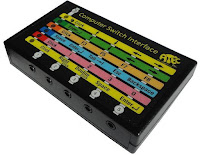
  • ATEC Switch Interface by Marblesoft
    • Access to most accessible software
    • Settings include proprietary Crick/Clicker settings
    • Change settings on interface box
    • Mouse Emulation
    • $69.95 
  • Hitch by Ablenet
    • Access to most accessible software
    • Mouse emulation
    • 5 switch ports
    • USB connection
    • $99
  •  Multi Switch by Inclusive
    • Access to most accessible software
    • Change settings using provided software
    • Automatically adjusts to most commercial switch software
    • Six switch ports
    • Switch testing through interface box
    • USB Connection
    • $155
  • Cordless Switch interface by RJ Cooper
    • off-the-shelf wireless presentation controller adapted with 2 switch ports
    • sends only mouse button "clicks"
    • $99
  • Switch Hopper and Switch Hopper by RJ Cooper
    • Frog shaped interface with 3 switch ports, or interface with built in button
    • sends mouse clicks or install software to change mouse button settings (affects all connected mice)
    • $99/$119
  • Switch Interface Pro 6.0 by Don Johnston
    • Access to most accessible software
    • Works with Crick/Clicker 5 and 6
    • Mouse emulator
    • Change settings using interface box
    • USB connection
    • 6 switch ports
    •  $94.99
  • USB Switch Interface Plus by Quizworks
    • Access to most accessible software
    • Works with Crick/Clicker
    • Mouse Emulator
    • Change settings using interface box
    • USB connection
    • "no repeat key" and "repeat key" settings
    • 5 switch ports
    • $99
  • Wireless Switch Interface by Quizworks
    • RF up to 100 feet 
    • Uses 9volt battery
    • Access to most accessible software
    • Works with Crick/Clicker
    • Mouse Emulator
    • Change settings on interface box
    • 5 switch ports
    •  $230
  • Crick USB Switch Box
    • Works with most accessible software
    • Created to work with Crick/Clicker 5 and 6
    • use software to change settings
    • website to assist with finding settings
    • 5 switch ports
    • USB Connection
    •  $159
  • Stealth Switch 5
    • Must be programmed to work with chosen software using software, settings then saved in interface so it can be moved without resetting
    • Use as a mouse emulator
    • 5 switch ports
    • USB connection
    • $79
  • Intelliswitch by Madentec
    • Works with most accessible software
    • Works with Discover Pro
    • Change settings using software
    • Wireless or wired, RF wireless up to 20 feet, wired uses USB
    • Heavier and bigger than most other interfaces
    • $299
  • Swifty by Orin
    • Thumb drive size interface
    • 1 switch port
    • Connect the Swifty Beam for wireless access to up to 3 switches
    • Mouse Emulator with Swifty Beam
    • $79.95
      Mouse Emulators on a Computer
      • ATEC Switch Interface by Marblesoft
        • Access to most accessible software
        • Settings include proprietary Crick settings
        • Mouse Emulation
        • USB connection
        • $69.95 
      • Mi-5 by TASH/Ablenet
        • Mouse emulation only
        • 5 switch ports
        • USB connection
        • $113 
      • Hitch by Ablenet
        • Access to most accessible software
        • Mouse emulation
        • 5 switch ports
        • USB connection
        • $99
      • Switch Interface Pro 6.0 by Don Johnston
        • Access to most accessible software
        • Works with Crick/Clicker 5 and 6
        • Mouse emulator
        • Change settings using interface box
        • USB connection
        • 6 switch ports
        •  $94.99
      • USB Switch Interface Plus by Quizworks
        • Access to most accessible software
        • Works with Crick/Clicker
        • Mouse Emulator
        • Change settings using interface box
        • USB connection
        • "no repeat key" and "repeat key" settings
        • 5 switch ports
        • $99
      • Wireless Switch Interface by Quizworks
        • RF up to 100 feet 
        • Uses 9volt battery
        • Access to most accessible software
        • Works with Crick/Clicker
        • Mouse Emulator
        • Change settings on interface box
        • 5 switch ports
        •  $230
      •  X-Keys USB by Pi Engineering
        • Mouse emulator or custom controls
        • Use software to control settings
        • Includes software development kit
        • USB connection
        • 12 switch ports
        • $129.95
      • Swifty by Orin
        • Thumb drive size interface
        • 1 switch port
        • Connect the Swifty Beam for wireless access to up to 3 switches
        • Mouse Emulator with Swifty Beam
        • $79.95

        For iOS (iPod, iPad, iPhone)
        • APPlicator Switch Interface by Inclusive/Pretorian
          • Bluetooth (wireless) interface (no PIN #, 65 foot range)
          • Works with both RJ Cooper and Ablenet settings
          • Controls music as well
          •  Four switch ports
          • $165
          • Hook by Ablenet
            • gives access to music only
            • use a computer to adjust settings
            • $149.99
          • Switchamajig
            • turns iPad into a switch to control attached, adapted items
            • $279 
          • Blue2 by Ablenet
            • works with Ablenet and Blue2 compatible apps only
            • built in switches or connect other to 1 or 2 switch ports
            • also works with a computer with included dongle
            • $149
          • The Shield by Tecla
            • Connect switches and or controllers to iOS devices
            • Use with Tecla app
            • Controls the entire device and certain apps
            • starts at $289 (add accessories and training if needed)
          • iScan MP3
            • works with 30 pin iOS devices
            • access to music only
            •  $299.95
          • Bluetooth Switch Interface by RJ Cooper
            • Works with compatible apps
            • 2 switch ports
            • lithium-ion battery
            • $99

                For Android
                • Click-to-Phone by Broadened Horizons
                  • Switch access to phone features, media and other features of Android
                  • Wireless
                  • Price includes training
                  • $399-1099 
                • The Shield by Tecla
                  • Connect switches and or controllers to Android devices
                  • Use with Tecla app
                  • Controls the entire Android device and certain apps
                  • starts at $289 (add accessories and training if needed)
                Misc
                • PageBot by Orin for Kindle
                  • Works with Kindle Keyboard, DX and Kindle 2
                  • Activate switch to turn to next page or previous page
                  • Includes mount for Kindle and PageBot
                  • $279.95-299.95

                25 Haziran 2012 Pazartesi

                Starfish Awareness Month

                To contact us Click HERE
                If you work in this field long enough Down Syndrome Awareness month starts being about Cory, Sean, Christian, David and Ricky.  Rett Syndrome Awareness Month becomes thoughts about Kelly, Jen and Becca.  AAC Awareness Month is about every kid who you ever helped say yes, no, help or "I love you!" for the first time with a "talker".  And that is just October.

                November brings Epilepsy Awareness Month and thoughts of every child who you've sat with, holding their hand and reassuring them, while you watched the clock and waited for the seizure to end.  Last month was Mitochondrial Disease Awareness Month and my thoughts were on Astrid, Ingrid and Sarah.  March may mean spring to some but it is both Cerebral Palsy Awareness Month and Developmental Disabilities Awareness Month.  Students with CP and Developmental Disabilities have made up the preponderance of my caseload for 15 years.  And I have loved every single one of them.

                I have walked, rode, crafted, rocked, danced and quilted for so many causes I can't begin to remember them all.  Not to mention all of the raffle tickets, candy, cookies, calendars and gift wrap I have bought.  Sometimes it all seems like it can't possibly make a difference.

                I know it is sappy but that is when my mind always goes back to the Starfish Story.  You know the one, with the little child tossing the drying starfish back in the ocean when the old cynic says it isn't going to do any good.  And the child says, "It makes a difference to this one."

                The thing is my students aren't starfish.  They are only helpless if we teach them to be helpless.  My job isn't to toss them back in the water.  My job is to teach them communication, independence and self-advocacy.  My job is to keep them from being beached in the first place and to teach them how to make sure they stay in the water where they belong.

                So I'm going to fight for more than awareness and for more than cures.  I am going to fight for all my students to be able to become who they are - fully and without compromise.  Are you with me?


                Things to Do with Extra Picture Symbols

                To contact us Click HERE
                What do you do with those left over communication symbols that seem to multiple everyday?  (They are especially prolific if you use the Unique Learning Program.)  Do you throw them away?  Hold on to them for some other purpose?

                Here is a multiple part activity you can do that includes sorting by part of speech and then using the symbols for MadLibs style activities.

                Part One: Teach your students the three basic parts of speech: noun, verb, adjective.  Although you may want to teach the parts of speech using the words that the student's AAC system uses/will use i.e. action words, describers, people/places/things.  (If you students are able to learn more then go for it!).


                Then do a class or group art project.  Decorate a cool container that will be used to hold each part of speech you teach.  You could use some of the left over symbols and magazine pictures to illustrate the type of word the container will hold.  Be sure to include a picture symbol label that matches the category in the AAC books/devices.

                Now you can set aside the symbols left over each day until you have a tidy pile of them and then allow a student to sort them into the correct containers.  This is a great way for emerging AAC users to work on catagories.  You can hold up a symbol and ask the student to show you in his book or device where they would find that word. (I would consider printing out a few sets of core vocabulary word symbols and adding them to the pile to be sorted on a regular basis.)

                Now you have containers of words to use for activities.  Some ideas include:
                • MadLib Style Activities - print out free, "easy" MadLib style activites and then allow student to pick from a field of two or three (or more) words from the correct container to fill in the blanks (we did this with some free Halloween MadLib's last week - so fun!) or you can go through a theme related paragraph or book you have already read to the students and turn it into a MadLib
                • Silly Sentences - have students pick one word from each jar and make a sentence 
                • Charades or Pictionary -play with peer tutors using words pulled from the containers
                • Art - use the symbols in art projects and collages related
                • Play Clap/Slap (adapt the movement as needed)
                • Sort the words even more - by topic or other criteria
                • Use spare symbols as "foils" when asking questions
                Free MadLib Style Activities
                • Printable MadLibs from Classroom Jr.
                • Teachnology MadLibs
                • Playsational MadLibs
                • Wacky Web Tales